A sourced guide to Arabic UI design: the choices that earn Saudi users' trust, and the checks to run before every release.
Arabic UI design means building the interface with Arabic as its first language, not translating an English interface and flipping it. It rests on five decisions: write the copy in Arabic from the start, mirror the layout without mirroring everything in it, set type and numerals for Arabic reading, make forms and search understand Arabic names and dates, and test with people who read the interface every day. In Saudi Arabia people use these interfaces almost entirely on their phones: mobile accounted for 99.4% of internet use in 2024, according to the Communications, Space and Technology Commission.
Why isn't translation enough to make an interface Arabic?
Translation carries the words across and leaves the English sentence logic in place. People read phrases that are grammatically correct and still feel foreign, and they sense the service wasn't made for them. The fix is to have the content owner write the Arabic from the idea itself, then write the English, not the other way round.
The opportunity is large. Internet penetration in Saudi Arabia reached 99% in 2024, according to the Commission, while only about 0.6% of the websites W3Techs tracks use Arabic.
Choosing the register
Modern Standard Arabic is what people expect from a government or financial service. Consumer apps can carry familiar Gulf vocabulary in notifications and short messages, as long as the choice is deliberate and written into the content guide, not changing from screen to screen.
Text length
Arabic translated from English usually runs longer; localisation tables put the increase at around 20 to 25% for long passages. Short buttons and headings break most easily, so design containers that can grow, and write the Arabic to fit its place instead of cutting it down after translation.
Latin words inside Arabic text
Many people type brand names and technical terms in Latin script. Place a Latin word at the start or the end of an Arabic sentence, not in the middle, so the reader's eye doesn't have to change direction mid-sentence. If a paragraph opens with a Latin word, put a right-to-left mark before it; otherwise a browser that detects direction automatically sets the whole paragraph left to right and moves its punctuation to the wrong side.
Images and context
Choose images from your audience's own life, not a generic picture of "the Arab world". Dress, places and occasions differ between Saudi Arabia and its neighbours, and people notice at once. Show images to reviewers from the target audience before you sign them off.

Write the Arabic from the idea itself, then the English, not the other way round.
What mirrors in an Arabic interface, and how should type and numerals be set?
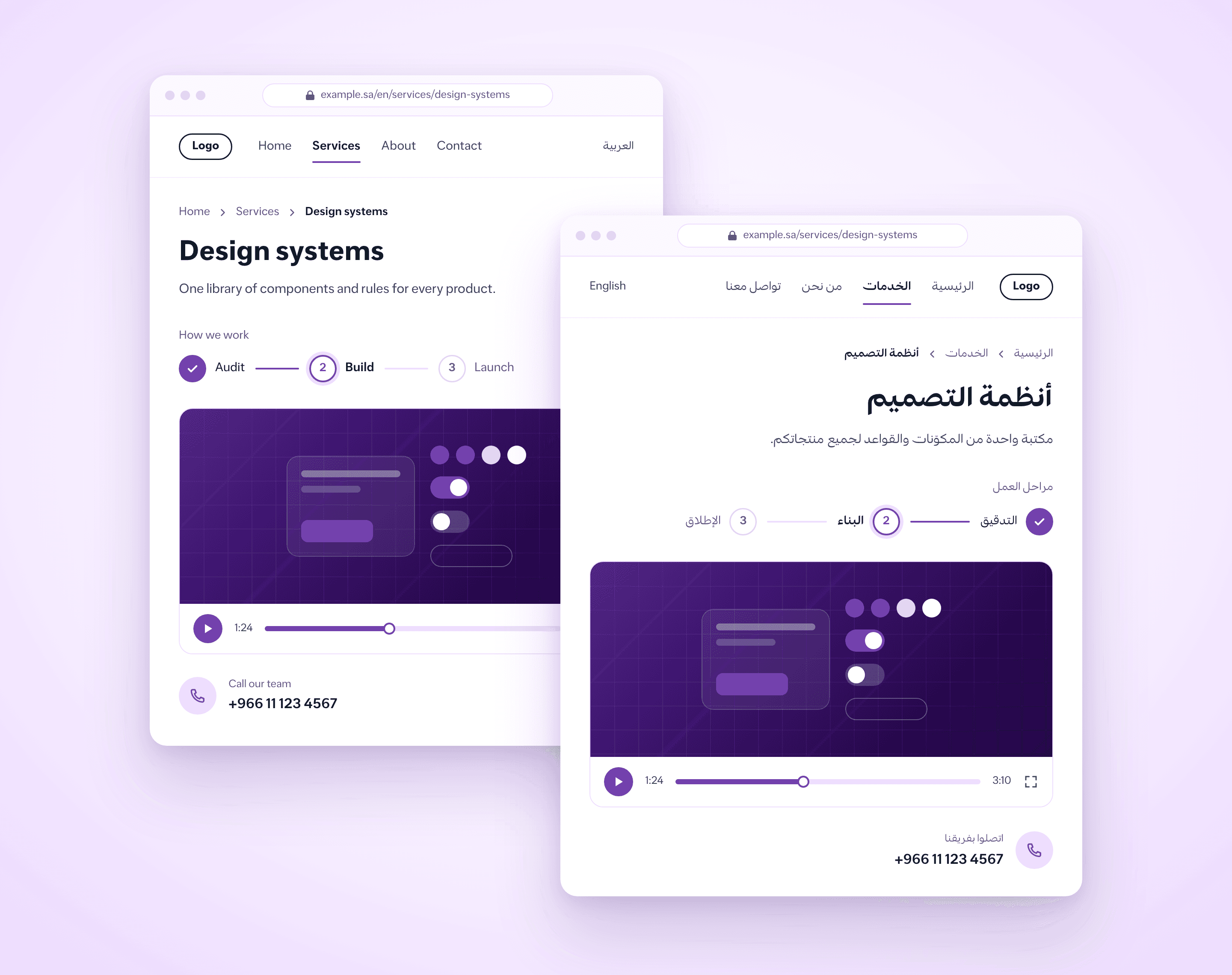
The rule for right-to-left (RTL) design: mirror whatever shows reading direction or movement, and leave alone whatever represents something in the real world or a fixed value.
What mirrors
The order of columns, lists and navigation, so everything starts from the right.
Back and forward arrows. In an Arabic interface the back arrow points right, as Apple's Human Interface Guidelines state.
Progress bars and sliders that show movement from one value to another, with their start and end symbols swapped.
Text alignment, indents and list numbering.
What stays the same
The numerals themselves. Never flip a year or a phone number, even when the order of a numbered sequence reverses.
Logos and brand marks.
Media playback buttons and their progress bar, because, as Material Design's guidance puts it, their direction represents the direction of the tape, not the direction of time.
Clocks, charts and photographs. If a photo's meaning depends on reading direction, make a new version of it rather than flipping it, as Apple's Human Interface Guidelines advise.
Icons with no direction, such as a camera or a checkmark.
Type and numerals
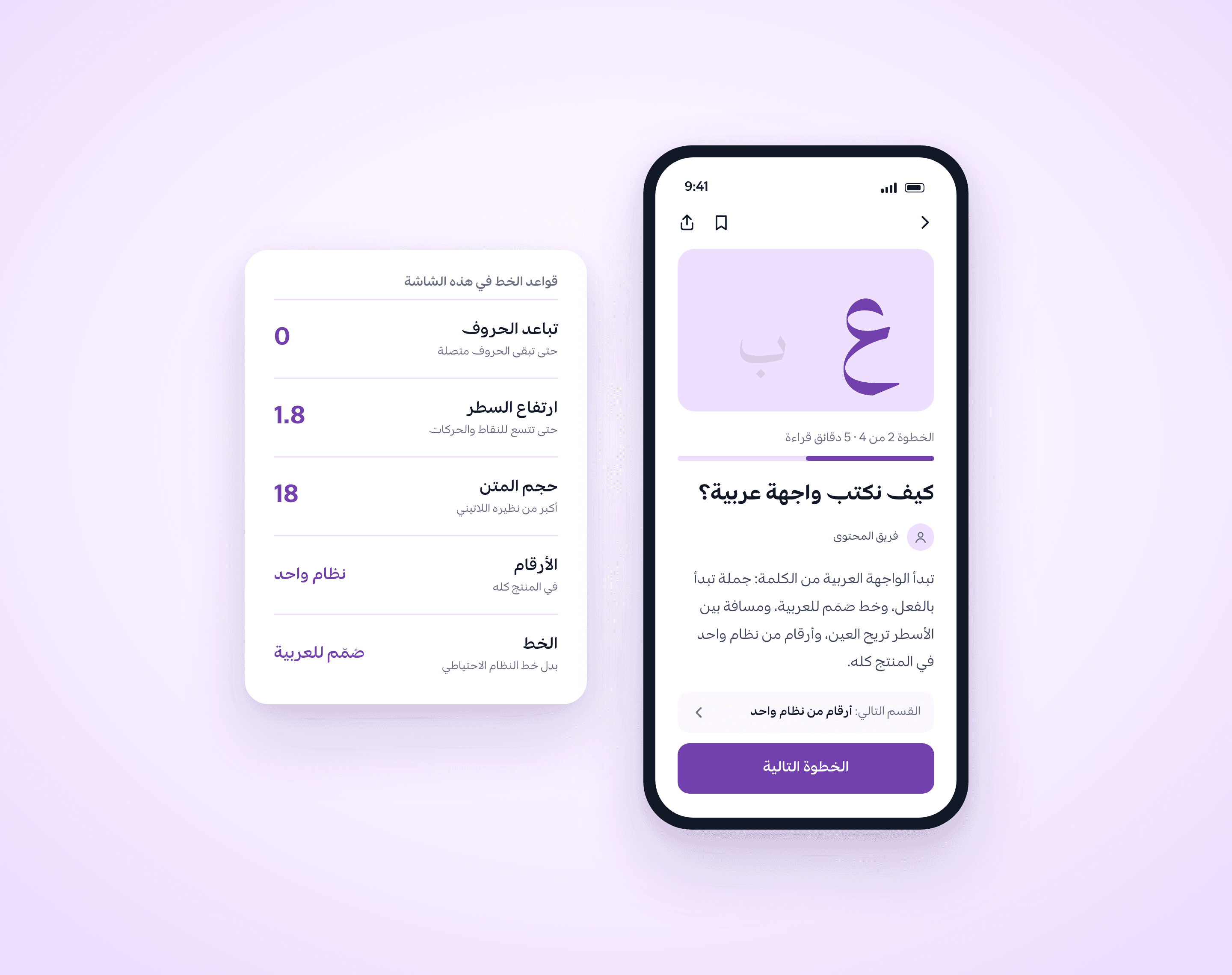
Arabic letters need more room than Latin ones at the same nominal size, because of the dots and marks above and below the line. Studies of on-screen reading suggest small sizes raise Arabic reading errors: in one study of readers aged 10 to 12, text at 16 and 18 point was easier to read, and text at 10 point produced the most errors.
Start Arabic at a larger size than its Latin counterpart, and test it on a phone, not a large monitor.
Give Arabic more line height than Latin.
Never add letter-spacing to Arabic; it breaks the joins between letters.
Arabic has no capitals, so build hierarchy with weight, size and colour.
Display one numeral system across the whole product, Western or Arabic-Indic, and don't mix them on screen; input fields still accept both.
Choose a typeface designed for Arabic, not a Latin one that leaves Arabic to the system fallback.
Choosing an Arabic typeface
Test the typeface on your real text, not on the sample line in its specimen. Set a long heading, a paragraph, a button label and an error message in it, then read them on a phone at the size you will actually ship. Check four things: it has every Arabic weight you need, not just bold; Arabic and Latin look close in size when they share a line; it supports the new Saudi riyal sign approved in 2025, and both Arabic-Indic and Western digits, because people type in either; and dots and diacritics stay clear at the smallest size you use. Drop any typeface that fails one of them, even if it looks right in the design file.
Direction in code
Set the direction attribute on the root element and never set the base direction in CSS, as the W3C Internationalization Activity recommends. Use logical properties, such as a margin at the start of the line instead of a left margin, so one stylesheet works in both directions. For text people type themselves, such as names and comments, let the browser detect the direction, and isolate Latin words inside Arabic sentences so the punctuation around them doesn't flip. If your interface runs on a design system, make these rules part of it, as we describe in our article on design system governance.
How do forms, search and testing work in an Arabic interface?
Forms
Names: many services in Saudi Arabia ask for the four-part name, and an Arabic name can be longer still. Don't force "first name" and "last name" fields unless the service needs them, and leave room for a full name.
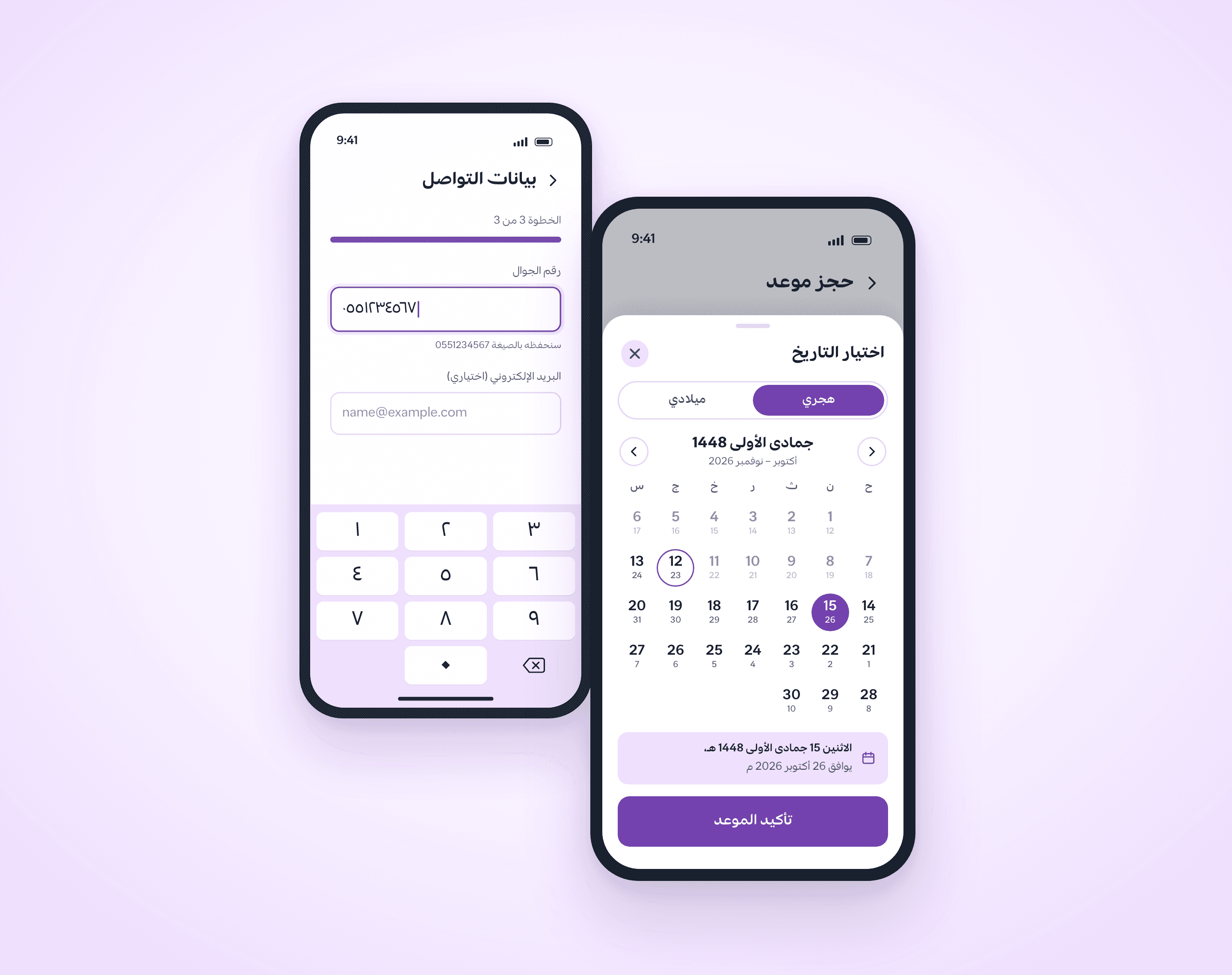
Dates: people in Saudi Arabia live with both the Hijri and the Gregorian calendars, and government salaries moved to the Gregorian calendar in 2016. Decide which calendar each field needs, show the other beside it when that helps, and calculate Hijri dates with the Umm al-Qura calendar.
Numbers and phones: phone, email and ID fields run left to right even on an Arabic page, so set their direction. Accept both Arabic-Indic and Western digits, and convert them behind the scenes.
Search
Arabic search fails when it treats أ, ا and إ as different letters. Before matching, normalise the hamza forms on alef (أ, إ, آ) to a bare alef (ا), teh marbuta (ة) to heh (ه) and alef maqsura (ى) to yeh (ي), and strip diacritics and tatweel, as the Arabic normaliser in the open-source Lucene search engine does. Accept Latin words in the same search box, because many people type a product's name in its original script. And never show "no results" without suggesting an alternative.

Accessibility
Set the language attribute on the page, and on every English passage inside it, as WCAG success criteria 3.1.1 and 3.1.2 require. Screen readers choose the voice and pronunciation from that attribute; without it, they may mispronounce Arabic. Our article on accessibility in design goes further.
Testing
Test with people who read Arabic every day, from the target country, on their own phones. Before every release, check:
Does the layout mirror, while logos, numerals and images stay as they are?
Does any text break or get cut off in a button or heading?
Does punctuation sit in the right place around Latin words?
Does search find a word whether its alef is typed with or without a hamza?
Do fields accept both Arabic-Indic and Western digits?
Does the screen reader read the page in an Arabic voice?
Government services have a national reference: in November 2024 the Digital Government Authority launched the Platforms Code, the unified design system for government platform interfaces. And if you need someone to test your Arabic interface with its users, talk to our team.